

What if I tell you there is a way to edit professional photos with minimal experience, sounds too good to be true, right? Well, yes, Adobe Express offers those possibilities to you.
With one-click background removal and templates for Instagram, TikTok, and more, you are one step closer to getting everything you need. Adobe Express Photo Editor isn’t just for content creators; it is also for any marketer wanting to turn photos into branded work.
Adobe Express is an easy, free photo editor for beginners and I am sure you know when it comes to editing we tend to focus more on video however little do you know, photo editing is just as important. I mean, you have to consider thumbnails, cover photos, and if you’re in marketing or own a business, you also need logos. Look, the list goes on. So, that’s where Adobe Express comes into play and there are a ton of options when it comes to photo editing.
Comparison Graph – Adobe Express & Adobe Photoshop
One major option that usually comes to mind is Photoshop. So, I want to bring up a comparison graph for you all so we can really see the true difference between the two.
I think the difference between Adobe Express and Adobe Photoshop really comes down to who they’re built for.
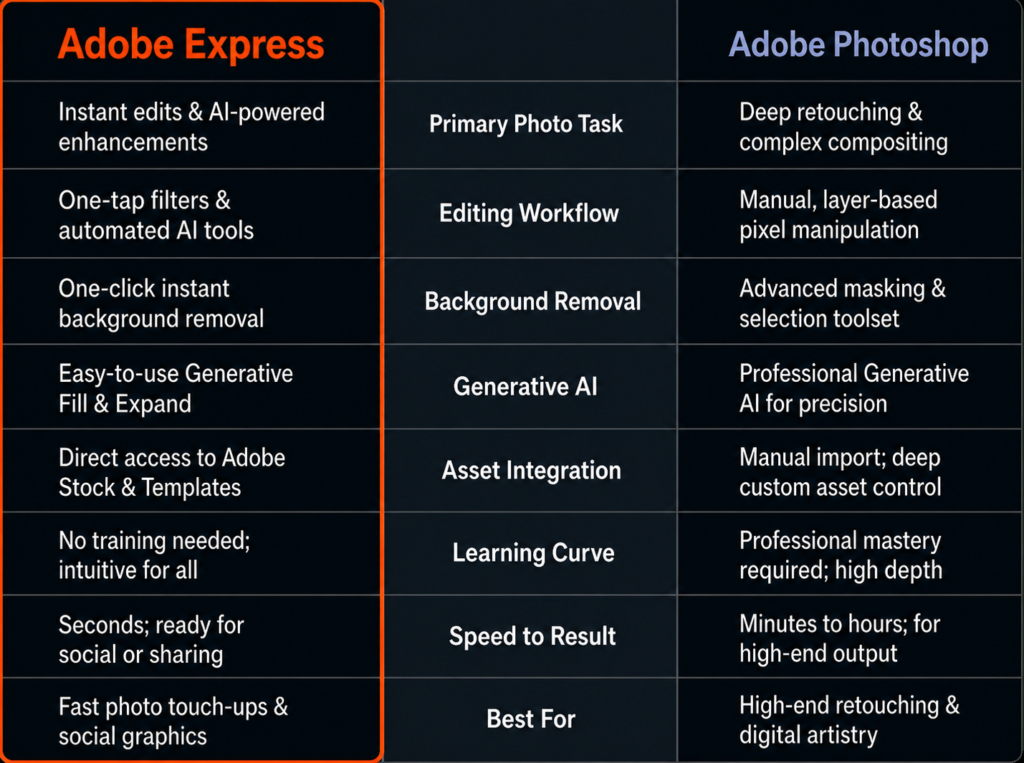
1) Adobe Photoshop is obviously incredibly powerful. It’s designed for deep retouching, advanced compositing, layer-based editing, and really precise creative control. If you’re a professional designer, photographer, or digital artist, that level of depth is amazing.
2) Adobe Express is basically meant for any creator just starting out or anyone looking for a faster, simpler workflow; in those cases, Adobe Express makes a lot of sense. Well most of the creators just want fast, clean, high-quality edits for social media, marketing content, thumbnails, product photos, or personal brands. And that’s where the Adobe
Express photo editor makes way more sense.
Adobe Express focuses on easy photo editing online with AI-powered features that simplify the entire workflow. For example, background removal in Adobe Express is fast, beginner-friendly and honestly incredibly simple with one-click background removal. You also get AI editing tools like generative fill and expand, quick filters, instant resizing for social media, and templates for Instagram, TikTok, and more, all built into one workflow and I think that’s the key difference.
Adobe Photoshop is built for precision and total control. Adobe Express is built for speed, simplicity, and creating content fast. And that’s why I think Adobe Express is one of the best online photo editors for beginners, creators, marketers, and honestly anyone who wants professional-looking content without needing professional editing experience, especially if your goal is to create branded content, edit social posts, touch up product photos, or remove backgrounds quickly then Adobe Express just feels way more approachable.
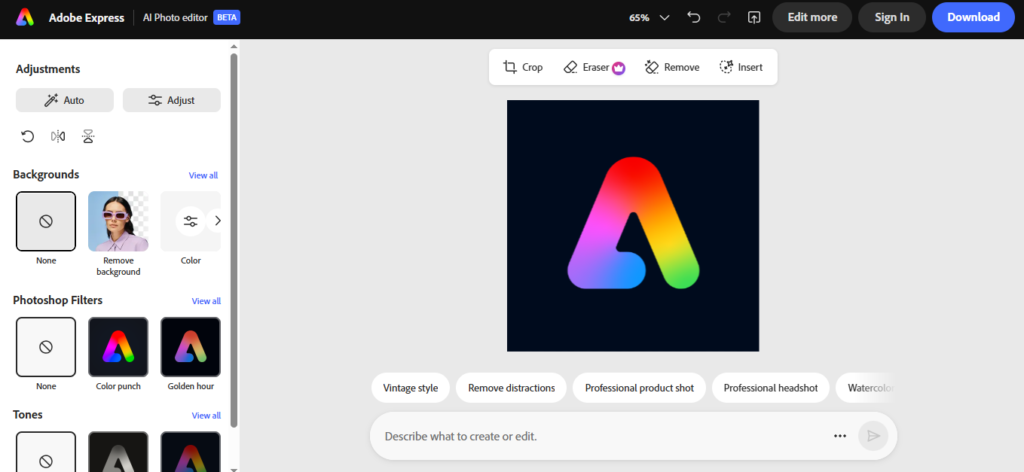
Adobe Express editing specifics
Now let’s dive into some Adobe Express photo editing specifics.
Adobe Express free background remover is probably one of the most useful AI editing tools for creators, marketers, and small businesses. For example, if I want to upload a photo into Adobe Express now once the image is in you can select the photo and right there it will give the option to remove the background.
It makes the photo editing process easy, instead of manually cutting out the subject or creating a mask one can easily remove photo backgrounds online basically with one click.
Now, once the background is removed I can continue and keep editing the image right inside Adobe Express.
I can resize it add any background color, place it on the template, or turn it into something like a thumbnail, product graphic, or social media post and thats why for me, this is where the Adobe Express background remover makes the most sense, it is not just removing the background, it’s helping you create something useful right after.
So in that case if you are making content for Instagram, TikTok, YouTube, or even marketing materials for a business this gives you a really fast way to take a regular photo and make it feel even more polished.
Adobe Express App Version
Now let’s explore mobile photo editing through its official app available for Android and iOS, this is a huge part of why Adobe Express makes sense for content creators as lot of the time you are not sitting at your desk when you need to make something sometimes you are on your phone, you just took a photo, and you need to turn it into a post, thumbnail, flyer, or quick branded content.
In the App you can easily make adjustments like cropping, resizing, changing the layout, adding text, or applying a quick filter and this is where easy online photo editing really matters because everything feels simple and approachable even on a phone.
For example, if I want to post an image on Instagram, but I also want to use it for a TikTok cover, or maybe a YouTube community post so instead of starting over every single time, I can use the resizing tools inside Adobe Express to quickly change the format and i can resize this design for Instagram, TikTok, YouTube, Facebook or whatever platform I need and you can actually turn photos into branded content directly from your phone.
All right. So, now we’re going to make our way back to desktop and talk about templates and branded content creation.
Design made easy with Adobe Express photo editor. A lot of people don’t necessarily struggle with the editing part; they struggle with the design part. Knowing where to place text, choosing colors, creating layouts, making content feel clean and professional. That’s usually the difficult part and that’s where templates makes the entire process way easier.And if you’re consistently creating content, this saves a massive amount of time, especially for creators, marketers, and small businesses that need to post often. Templates for Instagram, TikTok, and more make the content creation feel a lot faster and more manageable. I also like that Adobe Express combines templates with AI editing tools, because if I want to quickly remove a background, swap an image, extend a photo, or clean something up, I can do all of that without leaving the project.
So, instead of jumping between multiple apps, the Adobe Express photo editor keeps everything in one workflow.
Templates, branding, AI tools, resizing, and photo editing all together and I honestly think that is why the Adobe Express works so well for branded content creation where It helps you create professional looking content without needing advanced editing or graphic design experience.
So, after testing all these features, I think the bigger question is who is Adobe Express photo editor actually for?
Final Verdict
1) Adobe Express good for beginners? Honestly I think that is one of the biggest strengths of the Adobe Express photo editor as it is designed to make easy photo editing online simple and approachable, especially for people who don’t have professional editing experience.
2) Can Adobe Express remove photo backgrounds? Yes, the Adobe Express background remover lets you remove photo backgrounds online in just a few clicks, which is super useful for thumbnails, product photos, branded content, and social media graphics.
3) What can you create with Adobe Express? Well, you can create social media post, YouTube thumbnails, logos, flyers, product photos, branded content, and more using templates for Instagram, TikTok, and more. Along with AI editing tools and mobile photo editing features.